Two services on port 9000 split my traffic 8 to 12
Find and fix two services sharing one TCP port
The second service crashes with error 98
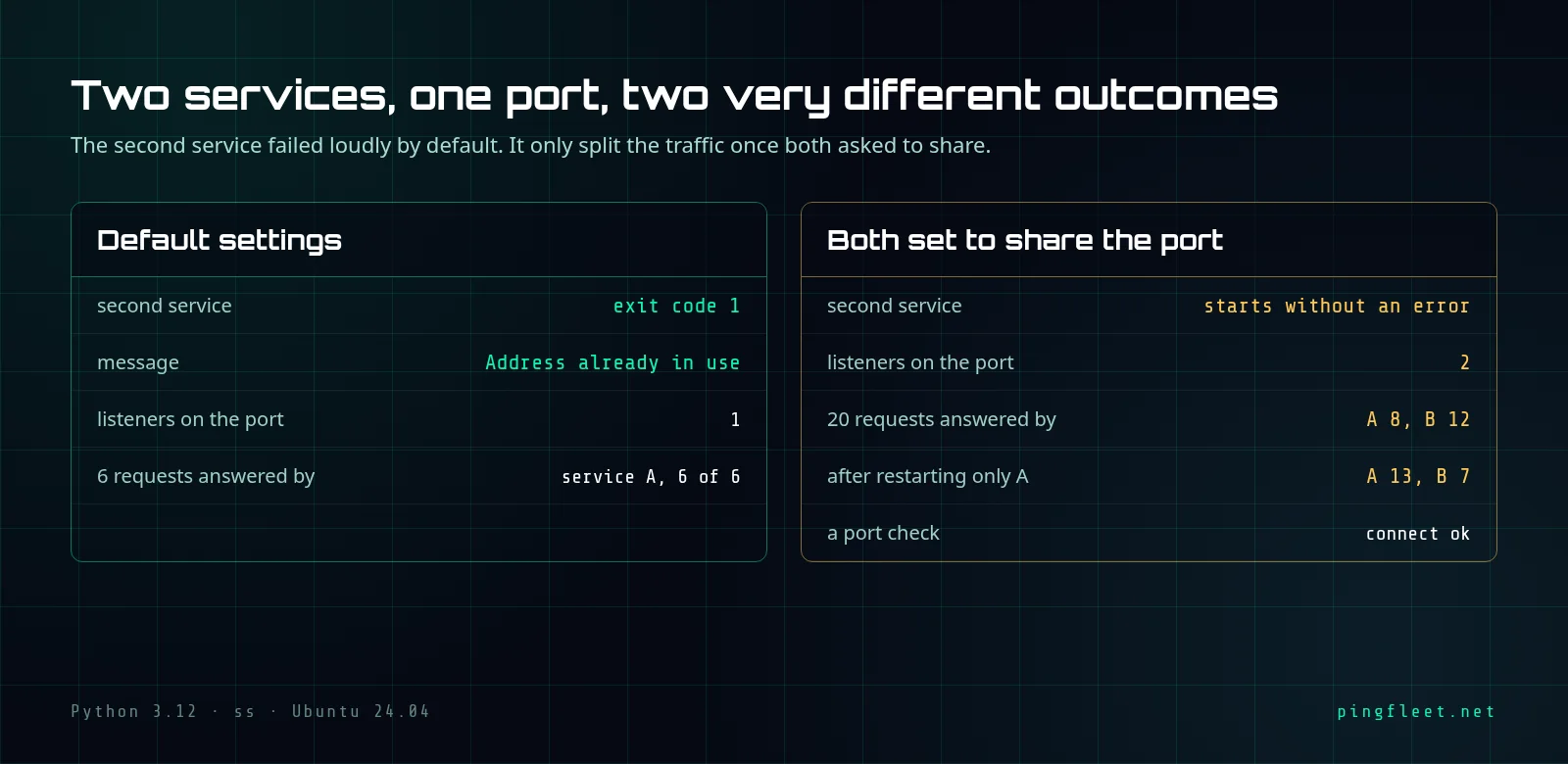
I ran this test expecting the second service to silently take the port from the first and answer all requests. On a disposable test VM running Ubuntu 24.04, I started 2 programs on port 9000. The first bound the port. The second never got past startup: the OS returned Errno 98, address already in use, and the process exited with code 1. All 6 test connections reached the first program.
This is the default behavior.
When a port is already taken, the bind system call refuses the second program with EADDRINUSE. The error is immediate. The program prints a traceback and stops with exit code 1, so you will see it in the logs and know the second program did not start.
The reboot scenario was not reproduced
The original idea behind this test was that a second service silently wins after a reboot and takes all traffic. That did not happen. I started both services by hand, no reboot was involved, and the first service kept answering in every test. What I can show is what happens when 2 programs bind the same port with and without SO_REUSEPORT.
What happens when both use SO_REUSEPORT?
SO_REUSEPORT is a socket option, available since Linux kernel 3.9, that lets more than 1 program listen on the same port at the same time. The socket(7) manual says the option must be set on each socket, including the first one, before calling bind, and all processes binding to the same address must have the same effective UID.
I turned SO_REUSEPORT on for both services and started them on port 9000. No error. The port listing showed 2 separate entries for the same port, each with its own PID.
I sent 20 TCP connections. 8 went to service A, 12 went to service B. I assumed the split would be 10 and 10. It was not, and the exact cause of the 8/12 ratio was not investigated.
Does a restart fix the split?
I stopped service A and started it again, the way a deploy or a package update would. Then 20 more connections: 13 went to A, 7 to B. The split shifted from 8/12 to 13/7, but both processes still answered.
A restart did not push all traffic to 1 service in this run. I think the exact ratio changes each time because it depends on conditions I did not control. I did not test this further.
A port check sees nothing wrong
A TCP connect test from outside reported port 9000 as open. That is all. It cannot show whether 1 process or 3 are behind the port, because the TCP handshake completes successfully with any of the listeners. If your uptime monitoring only checks whether a port answers, a silent split will never fire an alert.
How to find the second listener
Your operating system can list every process listening on a given port. On Linux, the ss tool shows the process name and PID for each listener on port 9000, and if 2 lines appear for the same port, you have the conflict. The ss(8) manual page documents the filters.
Once you see 2 entries, stop the one that should not be there. In the first test, before SO_REUSEPORT was involved, only 1 service held port 9000 and all 6 connections reached it. A monitoring check that opens a TCP connection will always report the port as healthy during a split because the handshake succeeds with any listener, and checking the actual HTTP response is the only way to catch it from outside.
For those who want the details
All tests ran on Ubuntu 24.04.5 LTS, kernel 6.8.0-146-generic, Python 3.12.3, on a disposable test VM. The test used a minimal TCP listener in Python, started with or without SO_REUSEPORT.
Starting service B on port 9000 with default socket options, it exits immediately. The traceback:
Traceback (most recent call last):
  File "/tmp/svc.py", line 7, in <module>
    s.bind(("0.0.0.0", 9000)); s.listen(16)
    ^^^^^^^^^^^^^^^^^^^^^^^^^
OSError: [Errno 98] Address already in use
The exit code was 1, meaning service B never started. The ss output confirmed only service A held the port:
State  Recv-Q Send-Q Local Address:Port Peer Address:PortProcess
LISTEN 0      16           0.0.0.0:9000      0.0.0.0:*    users:(("python3",pid=1042,fd=3))
All 6 TCP connections to port 9000 went to service A. Output from the 6 consecutive connections:
A
A
A
A
A
A
After stopping A and restarting both with SO_REUSEPORT, both bound port 9000. Their startup output:
A listening on 9000
B listening on 9000
Both processes appeared in the ss listing on port 9000. Each had its own PID:
State  Recv-Q Send-Q Local Address:Port Peer Address:PortProcess
LISTEN 0      16           0.0.0.0:9000      0.0.0.0:*    users:(("python3",pid=1094,fd=3))
LISTEN 0      16           0.0.0.0:9000      0.0.0.0:*    users:(("python3",pid=1092,fd=3))
Then I sent 20 TCP connections to port 9000. The kernel split them between the 2 processes:
      8 A
     12 B
I ran a TCP connect check from outside. It only reported port 9000 as open:
connect ok
I restarted only service A while B kept running. The next 20 connections split differently:
     13 A
      7 B
The ss listing after the restart still showed 2 entries on port 9000. Service A's PID changed from 1092 to 1127, confirming it was restarted, while B's PID stayed at 1094:
State  Recv-Q Send-Q Local Address:Port Peer Address:PortProcess
LISTEN 0      16           0.0.0.0:9000      0.0.0.0:*    users:(("python3",pid=1127,fd=3))
LISTEN 0      16           0.0.0.0:9000      0.0.0.0:*    users:(("python3",pid=1094,fd=3))
To list all processes on a specific port with ss, the command is ss -tlnp sport = :9000. The -t flag selects TCP sockets, -l shows only listening sockets, -n prevents hostname resolution, and -p shows the process behind each socket.