systemd says active and nothing is listening on the port
Three of four units said active with nothing listening
systemctl status says active (running). The PID is there, memory reads 264.0K, and the journal logged Started without a complaint. You move on. Twenty minutes later the monitoring fires: port 8082 is not answering, and ss -tlnp shows nothing bound to it.
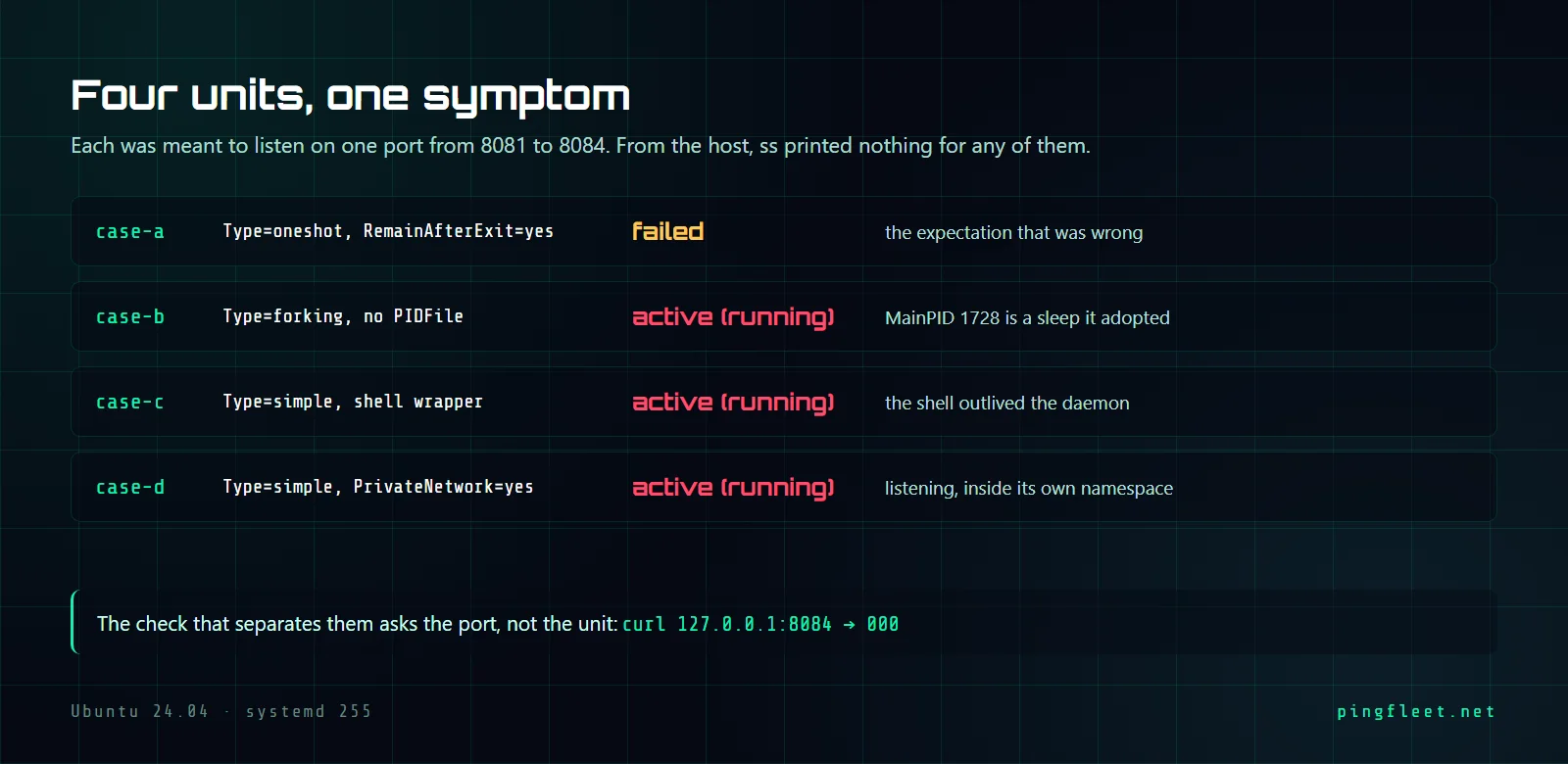
I built 4 unit files on a fresh Ubuntu 24.04.4 LTS virtual machine running systemd 255, each supposed to listen on one port from 8081 through 8084, each broken in a different way. Three came back active (running) with zero sockets visible from the host. The fourth went to failed instead of reproducing the symptom, which taught me something about RemainAfterExit that I had wrong. By the end you will know what each failure looks like in systemctl status and why the only reliable answer comes from asking the port directly.
I assumed RemainAfterExit would hold a failed unit active
Case A was Type=oneshot with RemainAfterExit=yes. The plan: ExecStart runs a binary that exits with code 1, and because RemainAfterExit is set, systemd keeps the unit active even though nothing is running.
It did not work. I assumed RemainAfterExit meant the unit would stay active regardless of the exit code, but the systemd.service(5) documentation is specific: it only applies after a successful exit, exit code 0. When ExecStart exited 1, the journal printed Main process exited, code=exited, status=1/FAILURE and the unit went straight to failed. It reported MainPID=0 and ExecMainStatus=1, both honest.
Type=forking and the orphan it adopts
Case B used Type=forking. The parent forked a child that ran sleep infinity, then the parent exited cleanly. No PIDFile was set, so systemd had to guess which surviving process was the daemon, and the only one in the cgroup was PID 1728: sleep infinity.
The systemctl status output looked convincing. Active: active (running) since Sun 2026-09-06 16:14:41 UTC, process 1727 exited status=0/SUCCESS, Main PID: 1728 (sleep), 1 task, 264.0K memory. The parenthetical says sleep rather than any daemon name, but you would have to be looking for it. The journal had exactly 2 lines, Starting and Started, with nothing between them to raise suspicion.
The cgroup tree confirmed it: └─1728 sleep infinity was the only process. When I stopped the unit, it went inactive and killed 1728, which is correct given what systemd believed. The fault is not in systemd. Type=forking without PIDFile means systemd will adopt whatever surviving child it finds, and here the only survivor was sleep.
What happens when the wrapper outlives the daemon?
Case C was Type=simple with a shell script as ExecStart. The script launched the daemon, the daemon refused (tinyd: refusing to start appeared in the journal), but the shell kept running as PID 1731. With Type=simple, the MainPID is the ExecStart process itself, so systemd tracked the shell, not the daemon. The shell was alive; the unit stayed active (running).
I think this is the most common version of this problem. Someone writes a wrapper that does environment setup, launches the actual binary, and then sits on sleep infinity or tail -f /dev/null to keep the unit from flapping. The binary crashes or never binds its port, the wrapper does not notice, and systemctl status reports the wrapper's PID with a clean bill of health. When I checked during cleanup, PID 1731 was still alive as sleep infinity long after the daemon had printed tinyd: refusing to start and exited.
The daemon that listens where nobody can hear
Case D was Type=simple with PrivateNetwork=yes in the [Service] section. From the host, ss -tlnp showed nothing on port 8084 and a curl request to 127.0.0.1:8084 returned 000. Meanwhile systemctl status reported active (running) with MainPID=1735.
The daemon was listening. Running ss -tlnp inside the process's network namespace showed LISTEN 0 5 127.0.0.1:8084, with python3 on PID 1735 holding the socket with fd 3. PrivateNetwork=yes gives the service its own namespace with an isolated loopback, completely disconnected from the host stack. The process was bound to 127.0.0.1 inside that namespace, and the host's 127.0.0.1 is a different interface entirely.
This is the only case out of 4 where the daemon was actually doing its job.
Nothing was wrong from systemd's perspective: the process was alive and the exit status was 0. The unit properties showed PrivateNetwork=yes, which is the clue, but systemctl status does not print sandbox flags in its default output. You would have to run systemctl show case-d.service --property=PrivateNetwork or read the unit file to notice it. The journal said only Started case-d.service - Case D private network namespace, the same single line as every other successful start.
Ask the port, not the unit
The 4 units gave 4 different answers to systemctl status. One was honest (failed), three claimed to be running. From ss -tlnp on the host, all 4 ports were absent. From curl, all 4 returned 000. The check that did not lie was the simplest: try to connect to the port.
port 8081 -> 000
port 8082 -> 000
port 8083 -> 000
port 8084 -> 000
The MainPID tracks whichever process the unit type rules select, and that process can be alive and well without listening on any port. Checking systemctl status confirms the process state, not the service state.
If you are writing a health check or a monitoring probe, curl -so /dev/null -w '%{http_code}' http://127.0.0.1:8082 or a raw TCP connect is the test that survives all 4 failure modes. For non-HTTP services, ss -tlnp | grep :8082 on the host works, though on minimal images iproute2 is stripped and ss(8) is not available. On the machine I tested, it was at /usr/bin/ss without installing anything, which is not always the case on images where somebody trimmed the install list down to the binary and its one job.