Revoke an SSH key from ten servers without Ansible
grep -v exits 1 when it removes every line from a file
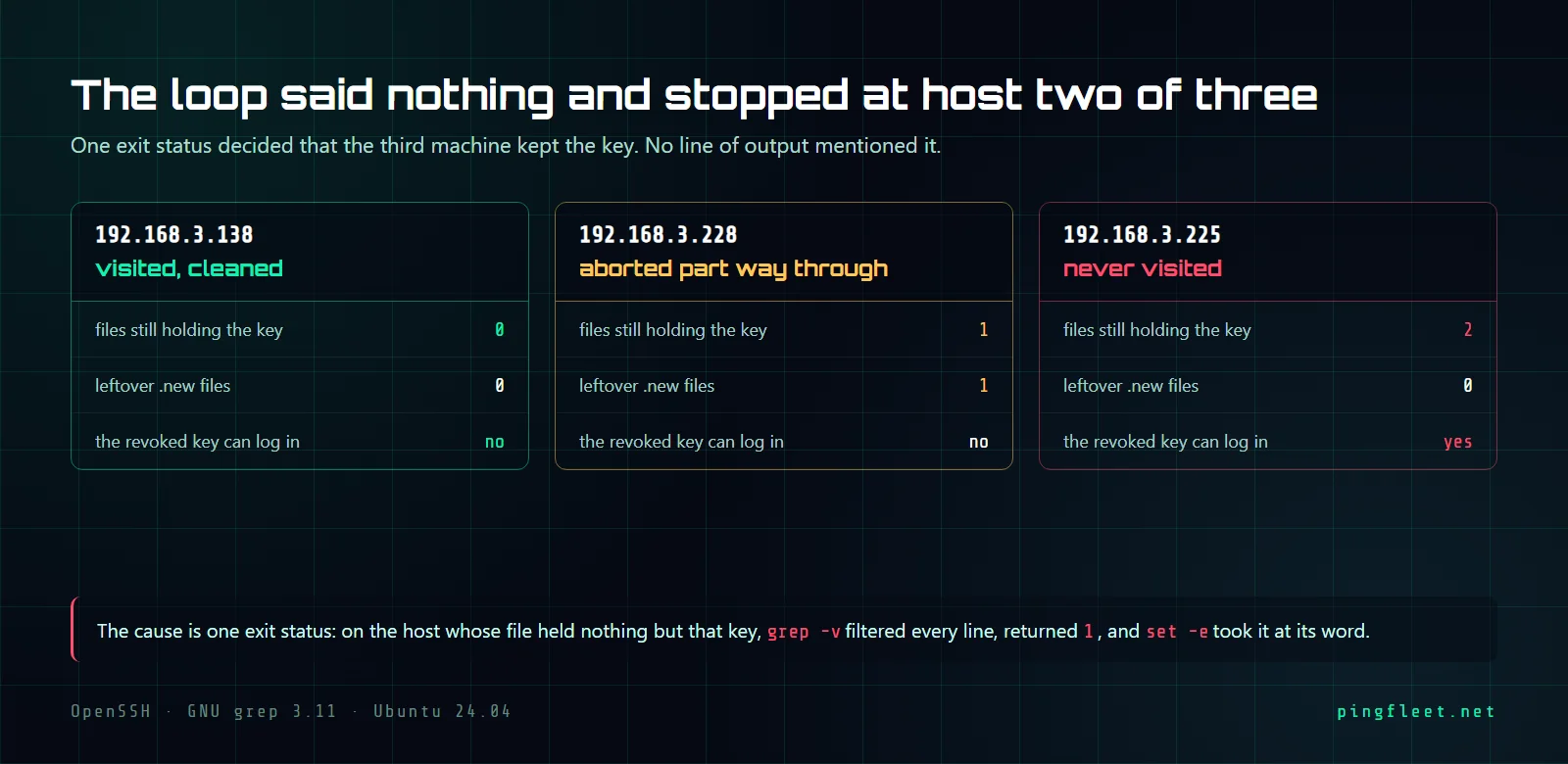
The loop visits 192.168.3.138 and cleans it. It reaches 192.168.3.228, starts writing a temporary file, and exits with status 1. The third host, 192.168.3.225, is never visited, and the key you wanted to revoke still accepts connections there.
That was 3 hosts with 5 authorized_keys files between them. The cause is a specific interaction between grep -v and set -e: when grep -v removes every line from a file, it returns exit code 1, and set -e interprets that 1 as a fatal error. By the end of this you will have a script that handles that exit code, matches by key material instead of by the comment field, and distinguishes hosts it could not reach from hosts where the key is actually gone.
The key and five authorized_keys files
The key being revoked is an ed25519 key with fingerprint SHA256:Cw82p0C79BSMs1BAGshABHhhyAWj6TBFRviim3/o6Zk, belonging to deploy@old-laptop. It sits in authorized_keys files on 3 hosts at 192.168.3.138, .225, and .228, under the claude, root, and deploy accounts, 5 files in total. Before starting, all 5 accept a login:
  [email protected]   IN as claude
  [email protected]   IN as claude
  [email protected]   IN as claude
  [email protected]     IN as root
  [email protected]   IN as deploy
The loop stops at the second host
The loop uses set -e, iterates over the 3 hosts, and for each one runs grep -v with the key pattern against every authorized_keys file it finds, writing the result to a .new file and moving it into place. On the test run it printed this:
  visiting 192.168.3.138
    cleaned 192.168.3.138
  visiting 192.168.3.228
  loop exit status: 1
Two lines for .138, one for .228, nothing for .225. A follow-up check counted leftover keys and orphaned .new files on each host:
  192.168.3.138   old key still in 0 file(s); leftover .new files: 0
  192.168.3.228   old key still in 1 file(s); leftover .new files: 1
  192.168.3.225   old key still in 2 file(s); leftover .new files: 0
Host .138 is clean, 0 files with the old key, no orphaned files. Host .228 still has the key in 1 file and a .new file sitting in a .ssh directory, abandoned mid-write. Host .225 was never touched, both its files still hold the revoked key, and the key still logs in from there: YES - STILL IN.
Why does grep -v exit 1 on a file it fully filtered?
The deploy account on 192.168.3.228 had exactly 1 key in its authorized_keys file, and that key was the one being revoked. When grep -v removed that line, zero lines remained. Zero selected lines means exit code 1: exit 0 is "one or more lines were selected," exit 1 is "no lines were selected." The file was filtered correctly, the target line was gone, but the exit code said failure.
That exit code killed the loop.
With set -e active, any command returning nonzero terminates the script. The grep -v did exactly what it was supposed to do: it removed the matching line and produced a correct, empty output. The shell saw exit 1 and stopped, leaving .228 half-cleaned and .225 never visited. The fix is grep -v "$PATTERN" "$file" || true, which converts that exit 1 into exit 0, keeping the loop alive when grep -v happens to filter out every line in the file.
Match the base64, not the comment
The comment field at the end of an authorized_keys line is free text that sshd(8) does not verify. The deploy@old-laptop at the end of the key line is whatever the person typed at generation time, and they can change it to deploy@new-laptop or just deploy without changing the key. Matching on the comment will miss the key if the comment was edited, and it will catch a different key if someone else used the same comment string.
The string to match is the base64 blob: AAAAC3NzaC1lZDI1NTE5AAAAIPQHANv3sQFivOs6Q5g631K/z5nEcJ8e77V7PHi8VtoN. That string is the public key material, it identifies this specific ed25519 keypair, and it does not change when the comment changes.
I assumed the regex ^[^#].*ssh- would count non-comment key lines in a file. On a file with 2 keys it matched 0: the character class [^#] consumes 1 character, and when the line starts with ssh-ed25519, that consumed character is the s, leaving sh-ed25519 AAAA... which does not contain the substring ssh-. The pattern was trying to skip lines starting with #, but it ate the first letter of every key line in the process. Matching on the base64 blob avoids the problem entirely.
The version that finishes
The corrected version matches by the base64 blob, wraps the grep -v with || true so exit code 1 does not stop the loop, and walks every authorized_keys file in /home/*/ and /root/ on each host. It cleaned the key from 5 files across all 3 hosts, and the output that matters is on .228, the host where the naive loop died:
-- 192.168.3.228
  not present in /root/.ssh/authorized_keys
  removed from /home/claude/.ssh/authorized_keys (1 lines left)
  removed from /home/deploy/.ssh/authorized_keys (0 lines left)
  files changed: 2
The (0 lines left) on /home/deploy/.ssh/authorized_keys is the case that produced exit code 1 before. This time the script wrote the empty file, left it in place, and moved to the next host without stopping.
After the full run, all 5 login attempts with the revoked key returned Permission denied (publickey), and the surviving key still worked on all 3 hosts. The || true on the grep -v was the only change that mattered for .228, where the single-key file had previously killed the loop.
Revoking a key does not close the session using it
An SSH session authenticates once, at connection time, and sshd does not re-check authorized_keys for the duration of that session. The key can disappear from the file while the session is open and the session will not notice. For this script, that means anyone logged in with the revoked key at the moment the script runs is still logged in after it finishes.
To verify, I opened a session as deploy on 192.168.3.228 running sleep 240, then removed the key from /home/deploy/.ssh/authorized_keys. A new login attempt with the revoked key was immediately refused with Permission denied (publickey). The sleep 240 session kept running.
Running who showed no deploy session because a non-interactive ssh command does not allocate a TTY, so who has nothing to display. The process was visible through pgrep -u deploy -a sleep, which returned PID 2172 running sleep 240. The session ended only after the server killed it, printing Connection to 192.168.3.228 closed by remote host.
I think most people do not check for open sessions after revoking a key, and in a homelab that is probably fine. On a machine where the key was compromised, you would want pkill -u deploy or a sshd restart after removing the key, and before that you would want to know what is running under that user. The pgrep -u <user> -a command gives a faster answer than who when the session has no TTY.
The audit says what it could not check
After a revocation you want a status for every host in the list. There are 3 statuses that matter: clean means the key is gone, PRESENT means it is still there, and UNKNOWN means the host could not be reached. The dangerous omission is the third one: a host that did not respond is not clean, it is unknown, and unknown means the key might still work there.
The audit ran against the 3 cleaned hosts plus no-such-host.invalid, a name that will never resolve. It reported 4 rows:
  192.168.3.138          clean
  192.168.3.225          clean
  192.168.3.228          clean
  no-such-host.invalid   UNKNOWN - could not read the host
To confirm the audit was not simply printing clean for everything, the key was put back on .138 and the audit ran again. This time .138 returned PRESENT in 1 file(s) while the rest stayed the same:
  192.168.3.138          PRESENT in 1 file(s)
  192.168.3.225          clean
  no-such-host.invalid   UNKNOWN - could not read the host
That positive control costs nothing to include and proves the audit can actually detect a key when one is there. Without it you are testing the key removal, not the audit, and the difference shows on the day a host is unreachable and the script says clean because it was never capable of saying anything else.