Set up an SSH jump host so private servers stay private
ssh -i key -J bastion silently ignores -i on the jump
The server accepts SSH from exactly one address. Your workstation is not that address. You type ssh -i mb_mgmt_ed25519 -J [email protected] [email protected] and the bastion answers Permission denied (publickey) before the private host even knows you tried.
This test ran on 2 virtual machines, both Ubuntu 24.04.4 LTS. By the end you will know which line in ssh -vv proves that -i does not reach the jump connection, how a config file fixes it, and what a ProxyJump session leaves on the bastion compared to ssh -A.
Two machines, one firewall rule
The bastion is 192.168.3.244 (hostname art-20260906-jumphost-bastion), the private host is 192.168.3.194 (hostname art-20260906-jumphost-private), both Ubuntu 24.04.4 LTS virtual machines on the same host. The private host has one UFW rule allowing port 22 from 192.168.3.244 only:
To                         Action      From
--                         ------      ----
22/tcp                     ALLOW IN    192.168.3.244
The private key at /c/Users/mb/.ssh/mb_mgmt_ed25519 lives on the workstation and was never copied anywhere. The bastion's ~/.ssh/ directory holds only authorized_keys, no private keys.
Why does -J ignore the key you gave it?
From the workstation, ssh [email protected] exits with code 255 and Connection timed out, which confirms the firewall rule works. The obvious next step is ssh -i /c/Users/mb/.ssh/mb_mgmt_ed25519 -J [email protected] [email protected], and it fails with Permission denied (publickey) on the bastion, exit code 255.
Adding -vv to the same command shows the problem. The SSH client authenticates to 192.168.3.244 for the jump connection separately from the final destination, and -i only applies to the final destination. For the jump, it falls back to 5 default key paths:
debug1: Authenticating to 192.168.3.244:22 as 'claude'
debug1: Will attempt key: /c/Users/mb/.ssh/id_rsa
debug1: Will attempt key: /c/Users/mb/.ssh/id_ecdsa
debug1: Will attempt key: /c/Users/mb/.ssh/id_ecdsa_sk
debug1: Will attempt key: /c/Users/mb/.ssh/id_ed25519
debug1: Will attempt key: /c/Users/mb/.ssh/id_ed25519_sk
None of those 5 files exist on this workstation. The actual key is called mb_mgmt_ed25519, and the jump connection was never told about it.
The jump connection never sees -i.
The config file tells both hops which key to use
The fix is a ~/.ssh/config that gives each hop its own IdentityFile. The ssh_config(5) ProxyJump directive replaces -J, and each Host block carries its own credentials:
Host bastion
  HostName 192.168.3.244
  User claude
  IdentityFile /c/Users/mb/.ssh/mb_mgmt_ed25519
  IdentitiesOnly yes

Host private
  HostName 192.168.3.194
  User claude
  IdentityFile /c/Users/mb/.ssh/mb_mgmt_ed25519
  IdentitiesOnly yes
  ProxyJump bastion
After saving that, ssh private connects straight through. The auth log on the private host confirms the connection came from 192.168.3.244 port 38756, the bastion's address:
Accepted publickey for claude from 192.168.3.244 port 38756 ssh2: ED25519 SHA256:H5OnU4Rq8ot45+FPNjEqr2wW0a5Dp0FkQEjahA3aSNU
I assumed -J would pass -i through to both connections and was surprised when it did not. ProxyJump establishes a separate SSH connection to the jump host, and that connection runs its own key lookup; -i only applies to the final hop. Adding IdentitiesOnly yes to both blocks prevents the client from offering keys from a running agent first, which matters on a workstation with 3 or 4 loaded keys that might exhaust MaxAuthTries before the right one gets a turn.
What agent forwarding leaves behind
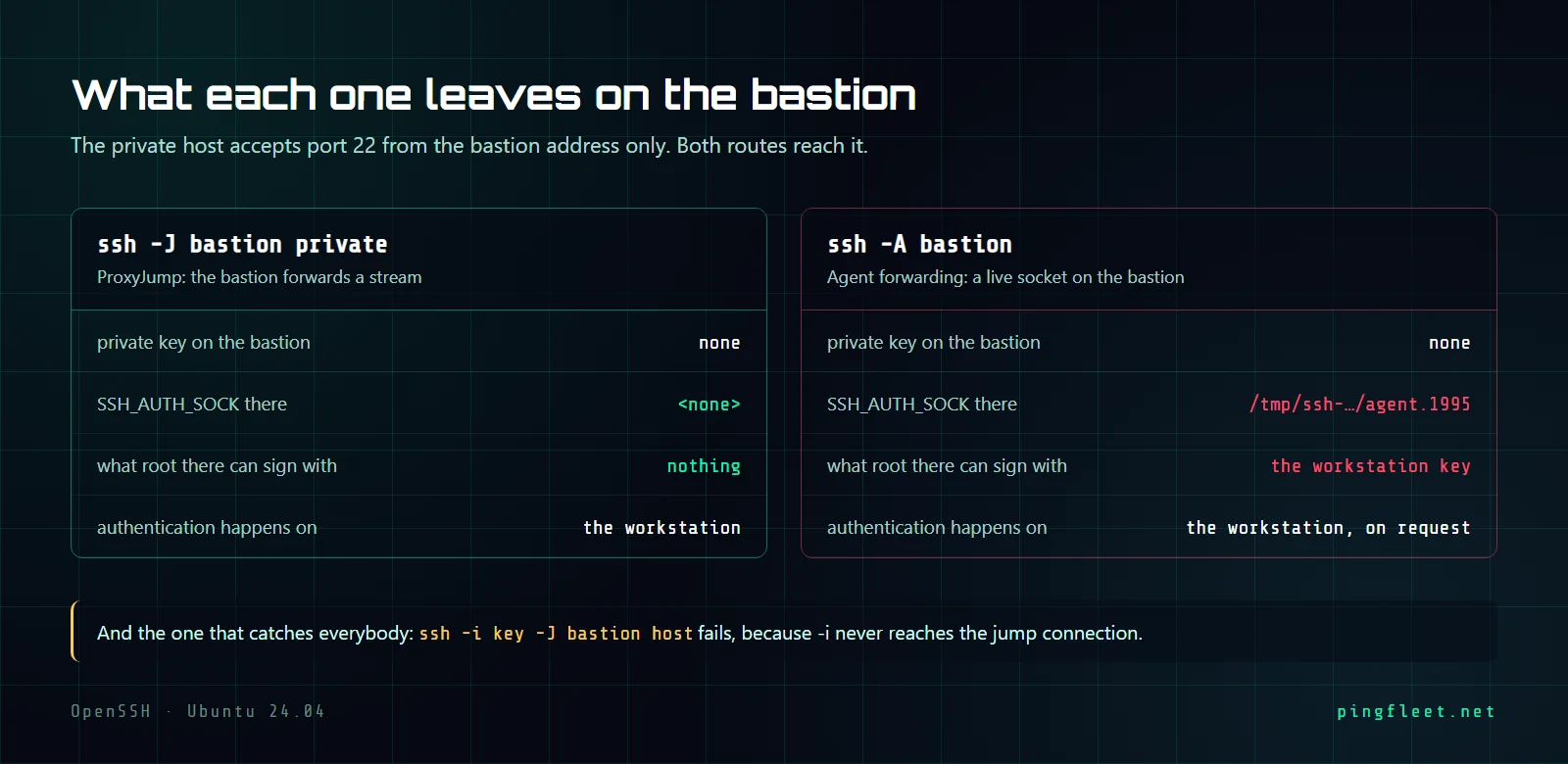
The older way to reach a host behind a bastion is ssh -A, which forwards your local SSH agent to the bastion so it can authenticate onward without needing a key file there. Both methods reach the same destination, and the difference is in what each one leaves on the bastion while the session is open.
With an agent running and ssh -A connecting to the bastion, a socket appears at /tmp/ssh-2mpcGZMuKj/agent.1995 and SSH_AUTH_SOCK points to it. Running ssh-add -l on the bastion during that session returns the workstation's key, and root on the bastion, using the same socket, sees exactly the same output:
256 SHA256:H5OnU4Rq8ot45+FPNjEqr2wW0a5Dp0FkQEjahA3aSNU mb-workstation-mgmt-DESKTOP-4IMO14I (ED25519)
With ProxyJump, none of that exists. The bastion shows SSH_AUTH_SOCK as empty, there is no /tmp/ssh-* socket, and root has nothing to list or sign with. I think this is the strongest reason to prefer ProxyJump over agent forwarding. Both methods reach the private host, but ssh -A leaves a socket on the bastion that root can use for as long as the session lives, and ProxyJump leaves nothing.
AllowTcpForwarding no blocks ProxyJump too
A bastion that should not allow arbitrary TCP forwarding would normally set AllowTcpForwarding no in sshd_config(5). The problem is that ProxyJump is TCP forwarding under the hood, so the same setting kills it:
channel 0: open failed: administratively prohibited: open failed
stdio forwarding failed
Setting PermitOpen 192.168.3.194:22 alongside AllowTcpForwarding no does not help; AllowTcpForwarding no takes precedence and the connection still fails with exit code 255. What does work is AllowTcpForwarding yes combined with PermitOpen 192.168.3.194:22 in the bastion's /etc/ssh/sshd_config:
AllowTcpForwarding yes
PermitOpen 192.168.3.194:22
With those 2 lines, ssh private reaches the private host through the bastion, but jumping to any other destination through the same bastion gets administratively prohibited and exits 255, which the test confirmed by trying a different address and watching it fail. In sshd_config(5), both AllowTcpForwarding and PermitOpen can go inside a Match User block, so one bastion account gets PermitOpen 192.168.3.194:22 and another gets PermitOpen none, and the bastion handles the routing with no change needed on any client.