Fix Nginx 502 when the upstream is already listening
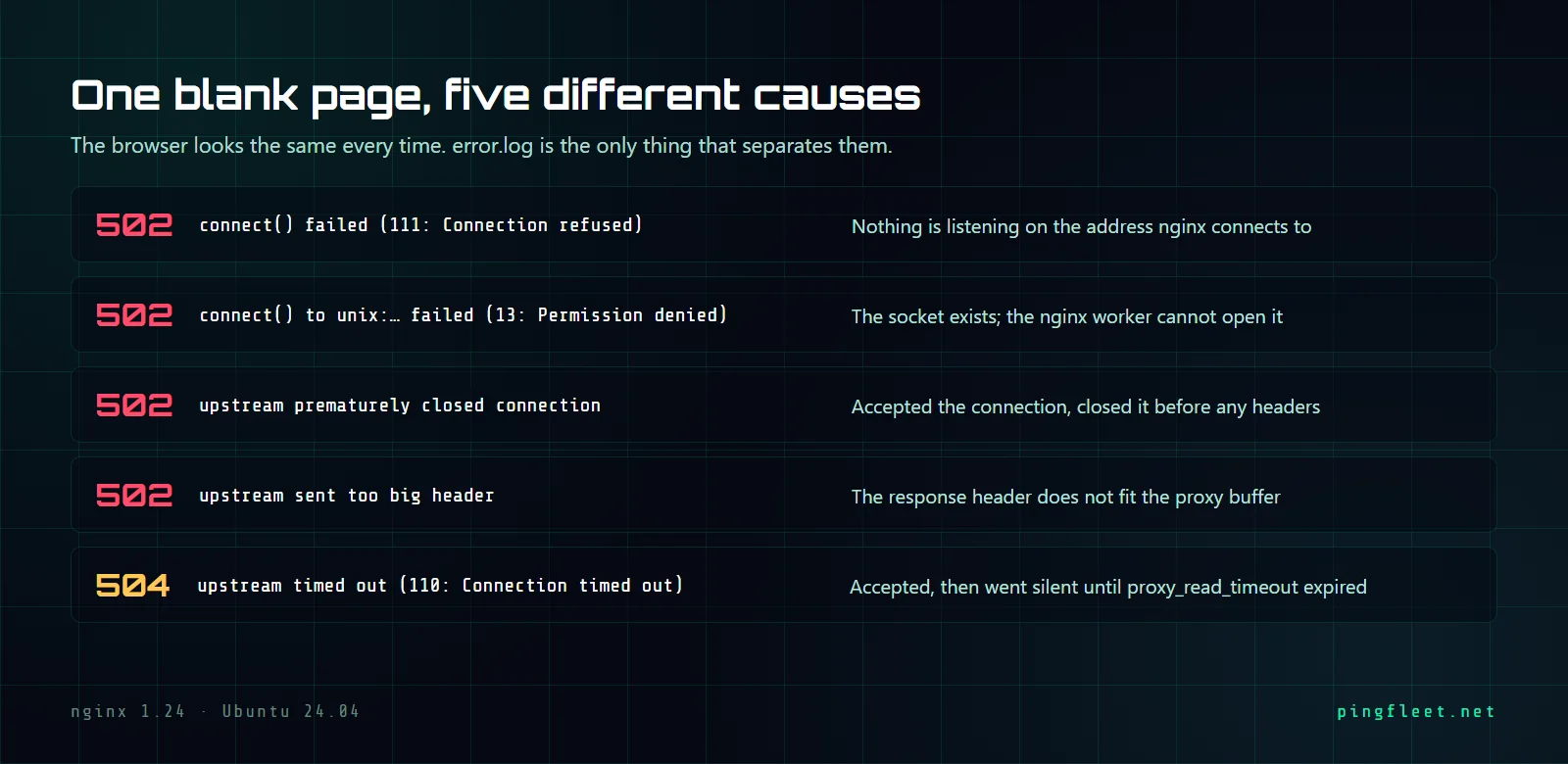
Four 502s and one 504, each a different log line
The service is up. You curl localhost:3000 and get a 200. Nginx returns 502.
You check the process, it is running. ss -tlnp shows it listening on port 3000, and proxy_pass points where it should. The 502 does not care.
The answer is in one line in /var/log/nginx/error.log, and it has been there since the first request. I reproduced four causes of 502 and one cause of 504 on a clean Ubuntu 24.04.4 VM running nginx/1.24.0, and each one writes a different error that names the problem directly. Here are all five, in the order I hit them.
Which 502 do you have?
Every failed upstream connection gets logged to error.log at level error or crit. The line ends with a phrase like while connecting to upstream or while reading response header from upstream, and the parenthesized number before it is the system error code from connect(2). That code and that phrase are your full diagnosis.
111: Connection refused
This is the simplest 502: nothing was listening on the address and port that nginx connected to. In my test, the upstream was not running at all.
2026/08/26 09:37:22 [error] 1817#1817: *1 connect() failed (111: Connection refused) while connecting to upstream, client: 127.0.0.1, server: , request: "GET / HTTP/1.1", upstream: "http://127.0.0.1:3000/", host: "127.0.0.1:8080"
The fix when nothing is running is obvious. The less obvious case is when the service is running and listening on the right port number but a different address: a process on 192.168.1.5:3000 will not answer a connect() to 127.0.0.1:3000, and the error code is the same 111.
Nginx tried both addresses and connected anyway
Several articles about nginx 502 errors say that if your upstream binds only to ::1 (IPv6 localhost) and your proxy_pass resolves to 127.0.0.1, you will get a 111. I set up the test to reproduce it: a Python HTTP server listening only on [::1]:3000, confirmed with ss.
LISTEN 0 5 [::1]:3000 [::]:* users:(("python3",pid=1893,fd=3))
A direct curl to the IPv6 address returned 200. I assumed nginx would fail with the same 111 as before.
It connected.
Nginx returned 200, and error.log had no new entry. The proxy_pass in this test used localhost, not the literal 127.0.0.1. When nginx calls getaddrinfo(3) with localhost, this Ubuntu 24.04 system returns both 127.0.0.1 and ::1. Nginx tried the first address, got ECONNREFUSED, tried the second, and the connection succeeded.
I think the "IPv6 binding causes 502" advice applies only when proxy_pass uses the literal IP http://127.0.0.1:3000, which skips resolution and never tries ::1. If your config says http://localhost:3000, nginx will try both addresses on any system where getaddrinfo resolves localhost to both.
13: Permission denied
This error is specific to unix sockets. The log level changes from error to crit, which helps when grepping.
2026/08/26 09:38:10 [crit] 1970#1970: *8 connect() to unix:/run/app.sock failed (13: Permission denied) while connecting to upstream, client: 127.0.0.1, server: , request: "GET / HTTP/1.1", upstream: "http://unix:/run/app.sock:/", host: "127.0.0.1:8080"
I created a socket at /run/app.sock owned by root:root with mode 0700. The nginx worker runs as www-data, so connect() returned EACCES. Before the fix, ls -la showed exactly what the problem was.
srw------- 1 root root 0 Aug 26 09:38 /run/app.sock
The fix is to give the nginx worker access: set the socket's group to www-data and its mode to 0660, or run the upstream under a user that shares a group with www-data. After the change, the same request returned 200.
The upstream closes the connection before sending headers
This 502 does not come from a failed connect(). The TCP handshake succeeds, nginx sends the HTTP request, and the upstream drops the connection before sending any response headers.
*12 upstream prematurely closed connection while reading response header from upstream, client: 127.0.0.1, server: , request: "GET / HTTP/1.1", upstream: "http://127.0.0.1:3000/", host: "127.0.0.1:8080"
There is no system error code in parentheses this time, unlike the 111 and 13 errors. This happens when the upstream process crashes mid-request, when it has an internal timeout shorter than it needs, or when a keep-alive connection closes at the exact moment nginx sends a new request on it.
Headers that did not fit
The last 502 I reproduced came from the upstream sending response headers larger than what nginx can buffer. Unlike the previous errors, this one has nothing to do with the TCP connection.
*14 upstream sent too big header while reading response header from upstream, client: 127.0.0.1, server: , request: "GET / HTTP/1.1", upstream: "http://127.0.0.1:3000/", host: "127.0.0.1:8080"
Nginx reads the first part of the upstream response into a buffer sized by proxy_buffer_size, which defaults to 4k or 8k depending on the platform. If your upstream returns a Set-Cookie with a few kilobytes of session data, or a response with dozens of custom headers, the default will not be enough. Increasing proxy_buffer_size to 16k in the location or server block fixes it without wasting significant memory per connection.
504 is a different error
One scenario I tested returned 504, not 502. The upstream accepted the TCP connection and then sent nothing at all. After proxy_read_timeout expired, nginx gave up.
*16 upstream timed out (110: Connection timed out) while reading response header from upstream, client: 127.0.0.1, server: , request: "GET / HTTP/1.1", upstream: "http://127.0.0.1:3000/", host: "127.0.0.1:8080"
The default proxy_read_timeout is 60s. In my test I set it to 3s to avoid waiting, and the 504 came back in 3.003376 seconds. The error code is 110 (ETIMEDOUT), not 111 (ECONNREFUSED), and the HTTP status is 504, not 502.
The difference matters because the troubleshooting direction is opposite. A 502 with code 111 means the upstream is not reachable: wrong address, crashed process, or a stopped service. A 504 with code 110 means the upstream is alive and accepted the connection, and then it sat there, which points to a problem inside the application: a query that never finishes or a lock that never releases.