LXC vs VM on Proxmox, and where the two really differ
An idle LXC holds 85 MiB; the VM beside it, 347
Both ran Debian 13 trixie. Both sat on pve-fury, same local-lvm, same afternoon. I created the LXC with pct create and the VM as a linked clone from a cloud-init template, then ran uname -r inside each one. The LXC returned 6.14.11-5-pve. The VM returned 6.12.101+deb13-cloud-amd64.
The first string is the host kernel. The second is a kernel the VM carries in its own /boot and loads into its own memory. The LXC does not have a /boot.
That uname -r output is the entire argument for containers.
Everything that follows is either a consequence of that shared kernel or a cost of it. Most LXC-versus-KVM comparisons on Proxmox cover the consequences and skip the cost, which is the more interesting half.
The container boots in the time the VM spends loading its kernel
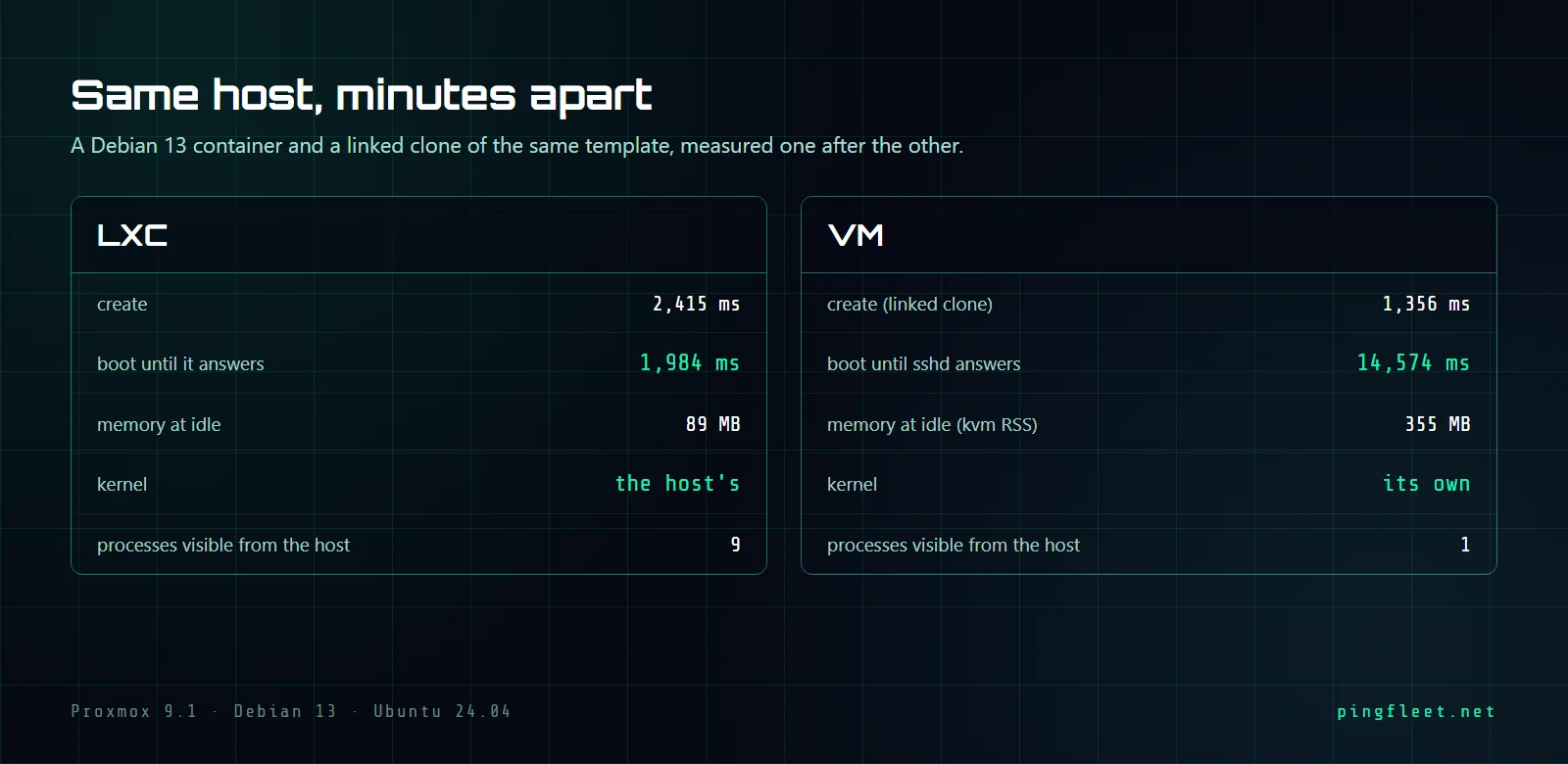
The LXC went from pct create to answering pct exec in 1984 ms. Creation itself took 2415 ms, longer than the boot, because it unpacks a rootfs tarball. The VM cloned in 1356 ms with qm clone (a linked clone writes metadata, not disk blocks) but then needed 14574 ms after qm start before sshd accepted a connection at 192.168.3.212. That 14574 includes BIOS emulation, GRUB, kernel decompression, systemd reaching its default target, and cloud-init applying the network config. The container starts its init directly inside a set of namespaces on the already-running host kernel, so its boot is process startup and nothing more.
I spent a week early on comparing pct create to qm create instead of to qm clone, which made VMs look slower to provision than they actually are. A linked clone finishes in 1356 ms. The gap that matters is the 1984 ms versus 14574 ms between power-on and a usable shell.
What does sharing a kernel actually cost you?
The LXC on pve-fury reported kernel 6.14.11-5-pve, which is whatever the host last booted after an apt upgrade. The VM ran 6.12.101+deb13-cloud-amd64, the stock Debian 13 cloud image kernel, independent of the host. The container cannot run a different kernel version, cannot load its own kernel modules, and cannot have separate /proc/sys tunables without lxc.mount.entry tricks. If a service needs a specific kernel feature, or a module the host does not load, or sysctl values that conflict with the host's own, it needs a VM.
I think this is where most quick comparisons go wrong. They list "shared kernel" as a limitation and move on, when it is the decision that determines everything else. A DNS resolver does not care which kernel runs underneath it. A database that needs vm.overcommit_memory set to a value the host cannot tolerate does.
Nine processes or one
The host saw 9 processes from the LXC, real entries in its own process table, each one visible to ps, strace, kill. The single qemu-system process it saw for the VM is an opaque boundary; the 229 MiB of userspace running inside, the whole Debian installation with its own systemd tree, is invisible from pve-fury. That opacity is isolation, and a shared kernel cannot give it to you.
85 MiB at rest
At idle, the LXC's cgroup v2 memory.current read 89575424 bytes, which is 85.4 MiB. That counter includes RSS, page cache, and kernel memory charged to the container. The KVM process for the VM reported an RSS of 355244 KiB, about 347 MiB. Inside the VM, free showed 229 MiB used out of 1974 MiB total, but the host does not see that breakdown; it sees one process holding 347 MiB, which includes QEMU's device emulation overhead, guest page tables, and every guest page that has been touched since boot.
The configured limits tell the same story in different units. The LXC had 512 MiB and an 8 GiB root volume on local-lvm. The VM had 2048 MiB and a 16 GiB disk, plus a 4 MiB cloud-init volume. You can trim a VM's allocation, but you cannot go below what a guest kernel and systemd need to boot, and that floor sits above where the LXC idles.
Neither machine was backed up with vzdump before I destroyed it, which breaks the usual procedure, but the LXC took 2415 ms to create and the VM 1356 ms to clone, and the measurement set above is worth more than either instance. The next thing I want to measure is iowait under identical workloads, because at idle both machines are doing close to nothing, and the 85 MiB versus 347 MiB gap might narrow or widen once they are both saturating the same local-lvm.